How to Build Your Own Personal AI Tutor Using NotebookLM and Custom GPTs for Exam Prep

How to Build a Personal AI Tutor with NotebookLM & GPTs

In 2026, the secret to academic success isn’t just about studying harder; it’s about studying smarter with a personalised AI ecosystem. Whether you are preparing for the BCS, medical boards, or university finals, the combination of Google NotebookLM and OpenAI Custom GPTs allows you to transform static textbooks into an interactive, 24/7 personal tutor.

At Tech Marvels, we believe that the right hardware, like a high-performance Lenovo Legion or an ultra-portable MacBook Neo, needs the right software strategy to truly empower your growth. Here is your step-by-step guide to building a private AI study hub that ranks as the most effective tool in your academic arsenal.

Phase 1: Deep Analysis with Google NotebookLM

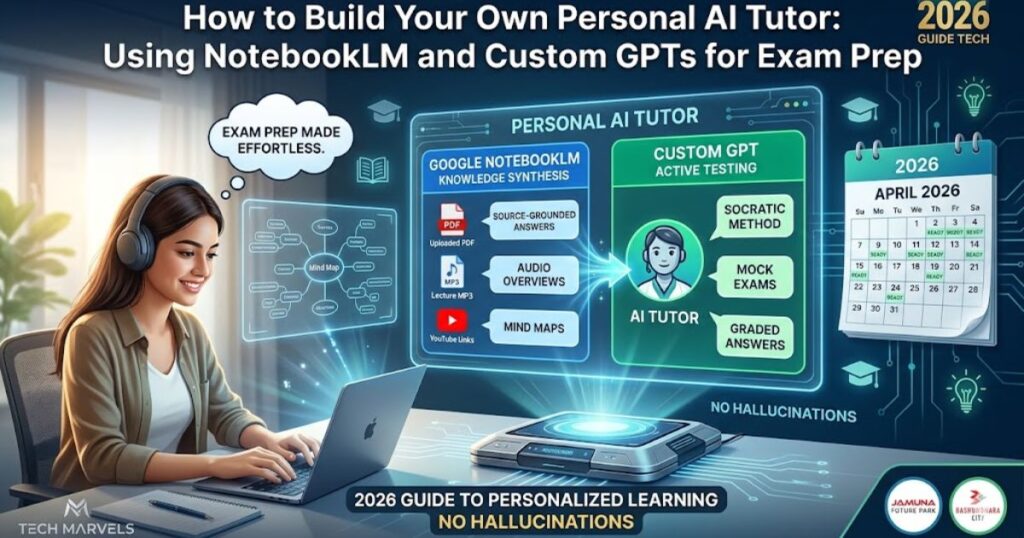
NotebookLM is the undisputed leader for “source-grounded” learning. Unlike standard AI, it only answers based on the documents you provide, virtually eliminating hallucinations.

How to set it up:

  1. Upload Your Sources: Create a new notebook and upload up to 50 sources, including PDFs, lecture recordings (MP3s), and even YouTube links of your favorite educational channels.
  2. Generate an “Audio Overview”: Use the 2026 improved Audio Overview feature to generate a deep-dive podcast where two AI hosts discuss your specific syllabus. It’s perfect for active listening during your commute in Dhaka.
  3. Interactive Mind Maps: Use the new “Visual Studio” in NotebookLM to auto-generate a mind map. This connects concepts across different chapters, helping you see the “big picture” of your subject.
  4. Auto-Quizzing: Ask the chat: “Generate a 20-question mock exam based only on these lecture notes, focusing on the hardest concepts.”

Phase 2: Active Testing with Custom GPTs

While NotebookLM is best for understanding content, a Custom GPT is superior for active testing and mimicking a specific tutor’s personality.

How to build your Custom GPT Tutor:

  1. Define the Persona: In the GPT Builder, give it specific instructions: “You are an expert Physics professor who uses the Socratic method. Do not give me the answer immediately; ask me probing questions to help me derive it myself.”
  2. Upload the “Truth” Files: Upload your past exam papers and official marking schemes into the “Knowledge” section (limit of 20 files).
  3. Configure Conversation Starters: Add buttons like “Test me on Chapter 5” or “Explain this like I’m 10” to jumpstart your study sessions.
  4. The “Exam Simulator” Mode: Instruct your GPT to grade your typed answers based on actual past-paper rubrics to give you a realistic score.

NotebookLM vs. Custom GPTs: Which to Use When?

FeatureGoogle NotebookLMCustom GPTs
Primary StrengthDeep document synthesisPersonality & active testing
Source LimitUp to 50 large filesUp to 20 files
Best OutputAudio Podcasts & Mind MapsReal-time Chat & Logic
EcosystemGoogle Drive / DocsChatGPT Plus / Store

Why Tech Marvels is Your Study Partner?

Building an AI tutor requires a machine that can handle heavy browser tabs, multi-window multitasking, and high-speed processing without lagging. As the most trusted laptop shop in Bangladesh, Tech Marvels provides high-spec hardware, from ASUS ROG to HP OmniBook, that ensures your AI tools run at peak efficiency. We don’t just sell you a laptop; we help you set up the digital workspace that will define your future success.

Visit us to find your perfect study machine:

  • Jamuna Future Park Store: Level #4, Zone #B, Shop No: 4B-013C
  • Bashundhara City Store: Shop: 91, Block: C, Level: 5, Dhaka-1215.
  • Mobile: 𝟎𝟏𝟔𝟎𝟗𝟑𝟏𝟑𝟎𝟐𝟗, 𝟎𝟏𝟓𝟏𝟖𝟗𝟐𝟏𝟔𝟑𝟗

Conclusion: Your Personalised Path to 2026 Success

In summary, building a personal AI tutor is about leveraging the unique strengths of each tool. Use NotebookLM to organise your messy notes and visualise connections, and use Custom GPTs to drill and test your knowledge under pressure. By combining these AI strategies with a reliable high-performance laptop from Tech Marvels, you aren’t just preparing for an exam; you are mastering a subject with the most advanced technology available today.

Frequently Asked Questions (FAQ)

1. Is my data private when I upload it to NotebookLM?

Google states that individual data uploaded to NotebookLM is not used to train their global models, ensuring your personal study notes remain private.

2. Can I use these tools on a mobile phone?

Yes, both NotebookLM and ChatGPT have robust mobile apps, but for building tutors and detailed mind-mapping, a laptop with a larger screen is highly recommended.

3. Do I need a paid subscription for these?

NotebookLM is currently free with a Google account. Custom GPTs require a ChatGPT Plus subscription (though some basic features are appearing for free users).

4. Can I share my AI tutor with my classmates?

Yes! NotebookLM allows you to share a “view-only” link to your notebook, and Custom GPTs can be shared via a private link.